Saturday, September 26, 2020
@echo off
title Activate Microsoft Office 2016 ALL versions for FREE!&cls&echo ============================================================================&echo #Project: Activating Microsoft software products for FREE without software&echo ============================================================================&echo.&echo #Supported products:&echo - Microsoft Office Standard 2016&echo - Microsoft Office Professional Plus 2016&echo.&echo.&(if exist "%ProgramFiles%\Microsoft Office\Office16\ospp.vbs" cd /d "%ProgramFiles%\Microsoft Office\Office16")&(if exist "%ProgramFiles(x86)%\Microsoft Office\Office16\ospp.vbs" cd /d "%ProgramFiles(x86)%\Microsoft Office\Office16")&(for /f %%x in ('dir /b ..\root\Licenses16\proplusvl_kms*.xrm-ms') do cscript ospp.vbs /inslic:"..\root\Licenses16\%%x" >nul)&(for /f %%x in ('dir /b ..\root\Licenses16\proplusvl_mak*.xrm-ms') do cscript ospp.vbs /inslic:"..\root\Licenses16\%%x" >nul)&echo.&echo ============================================================================&echo Activating your Office...&cscript //nologo ospp.vbs /setprt:1688 >nul&cscript //nologo ospp.vbs /unpkey:WFG99 >nul&cscript //nologo ospp.vbs /unpkey:DRTFM >nul&cscript //nologo ospp.vbs /unpkey:BTDRB >nul&cscript //nologo ospp.vbs /unpkey:CPQVG >nul&cscript //nologo ospp.vbs /inpkey:XQNVK-8JYDB-WJ9W3-YJ8YR-WFG99 >nul&set i=1
:server
if %i%==1 set KMS=kms7.MSGuides.com
if %i%==2 set KMS=kms8.MSGuides.com
if %i%==3 set KMS=kms9.MSGuides.com
if %i%==4 goto notsupported
cscript //nologo ospp.vbs /sethst:%KMS% >nul&echo ============================================================================&echo.&echo.
cscript //nologo ospp.vbs /act | find /i "successful" && (echo.&echo ============================================================================&echo.&echo #My official blog: MSGuides.com&echo.&echo #How it works: bit.ly/kms-server&echo.&echo #Please feel free to contact me at msguides.com@gmail.com if you have any questions or concerns.&echo.&echo #Please consider supporting this project: donate.msguides.com&echo #Your support is helping me keep my servers running everyday!&echo.&echo ============================================================================&choice /n /c YN /m "Would you like to visit my blog [Y,N]?" & if errorlevel 2 exit) || (echo The connection to my KMS server failed! Trying to connect to another one... & echo Please wait... & echo. & echo. & set /a i+=1 & goto server)
explorer "http://MSGuides.com"&goto halt
:notsupported
echo.&echo ============================================================================&echo Sorry! Your version is not supported.&echo Please try installing the latest version here: bit.ly/downloadmsp
:halt
pause >nulOffice 2016 Active
Tuesday, September 22, 2020
Activating Windows 10 Using The Batch File
|
Activating Windows 10 Using The Batch File
Tuesday, September 15, 2020
How can I install Microsoft SyncToy on Windows 10?
To install SyncToy on Windows 10, you need to do the following:
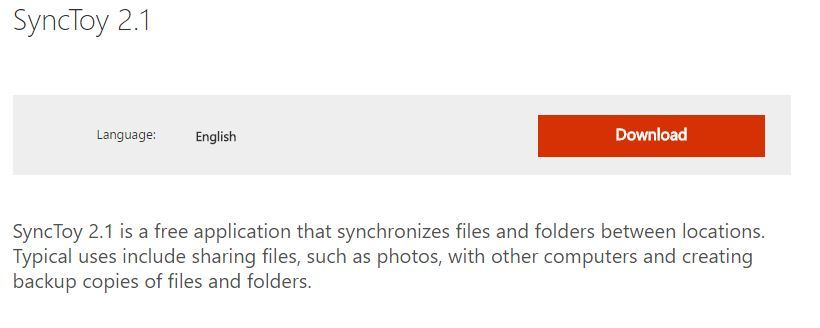
- Visit Microsoft Download Center.
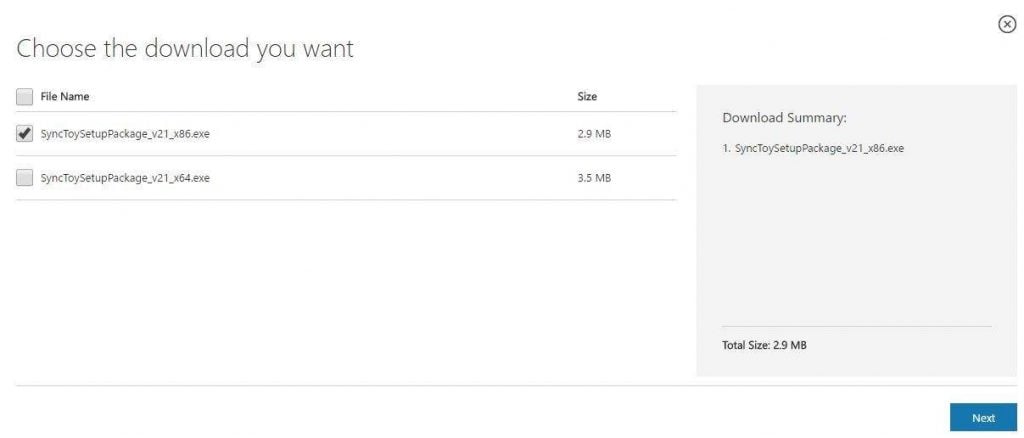
- Click the Download button.

- Select the version you wish to download. If you use the 32-bit version of Windows 10 select the x86 version, but if you use 64-bit Windows, be sure to select the 64-bit version of SyncToy. Click the Next button to start the download.

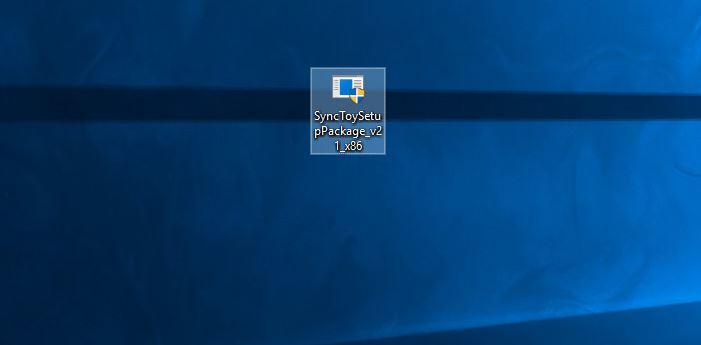
- Once the download is completed, locate the file you just downloaded and double click it to start the setup.

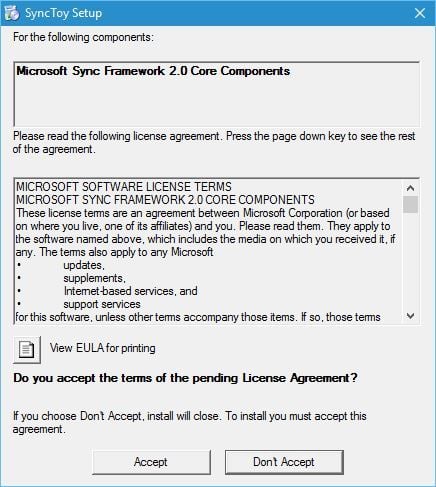
- The first thing you’ll notice is the Microsoft Sync Framework 2.0 Core Components agreement. Read it, and click the Accept button.

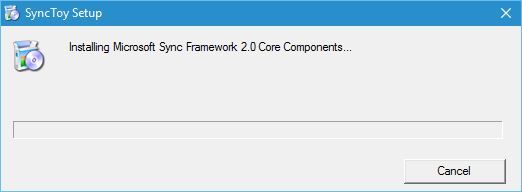
- Wait until setup installs Microsoft Sync Components.

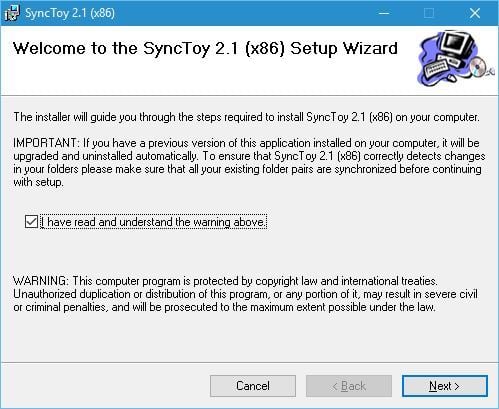
- Setup will now give you a warning message. Read it, check I have read and understand the warning above and click the Next button.

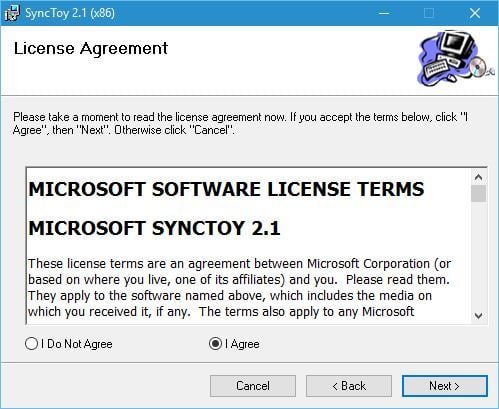
- Now you’ll see the License Agreement. Read it, select the I Agree option and click the Next button.

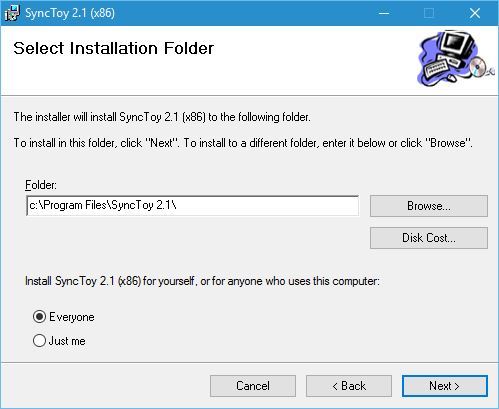
- Select the destination directory where you want to install SyncToy. If you want, you can install the application just for the current user or for all users on this computer. Once you’re done, click the Next button.

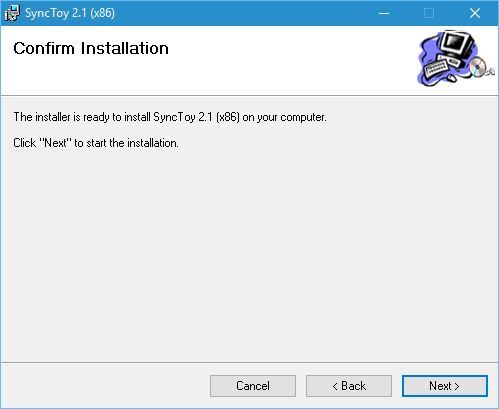
- Click the Next button once again to start the installation process.

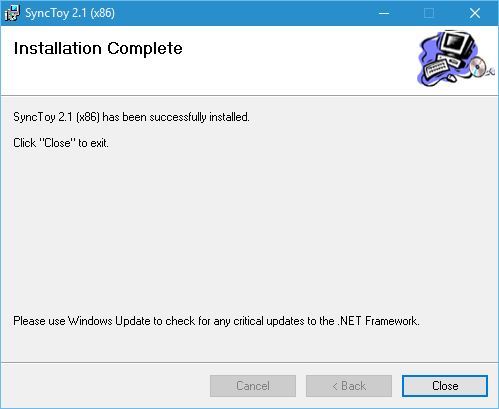
- Once the setup is completed click the Close button.

After the SyncToy is installed, you can start it by double-clicking the SyncToy 2.1 shortcut.
To start synchronizing your folders you need to do the following:
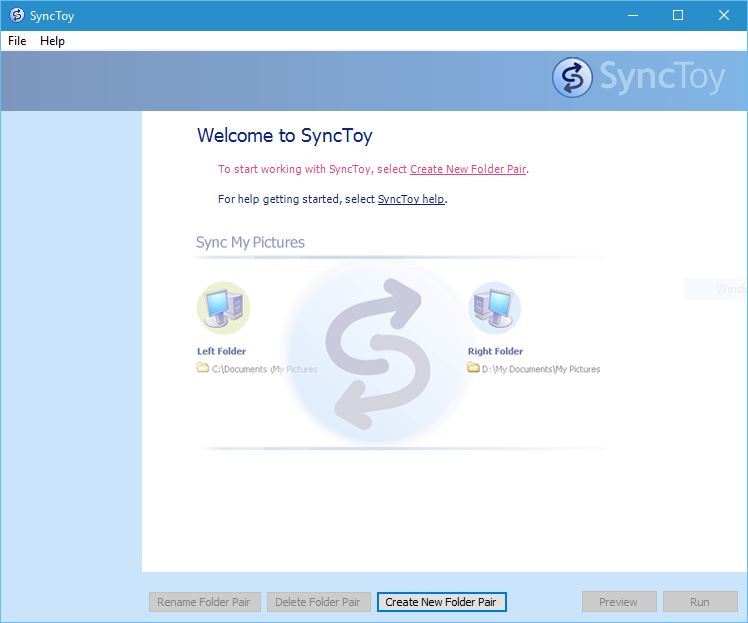
- When the application starts click the Create New Folder Pair.

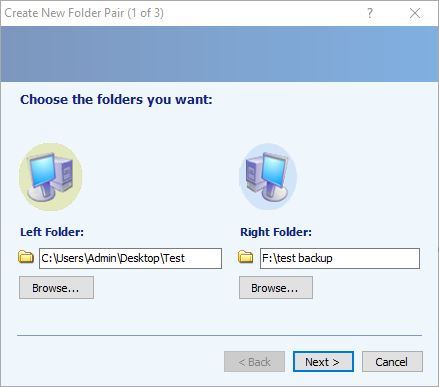
- Now you need to select the left folder and right folder. Click Browse and select the two folders that you want to synchronize. After you’re done click the Next button.

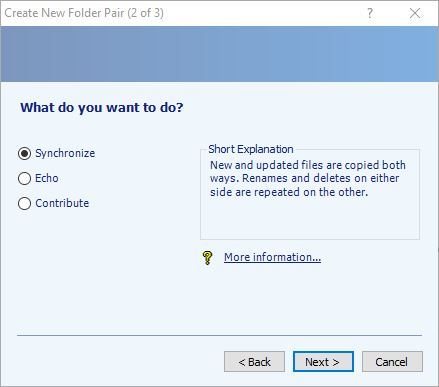
- Now you need to select which method of synchronization you want to use. There are three methods available: Synchronize, Echo and Contribute. Synchronize options will synchronize any new, deleted, or renamed files. This means that if you delete or rename any file in either of the two folders, the changes will be performed to the second folder as well.
The second option is the Echo, and it works similarly to the previous option but with one difference. While using this option changes are only applied from the left to the right folder. This means that if you make any changes in the right folder, they won’t be applied to the left folder.
The last option is called Contribute, and it’s the safest option to use. This option allows you to rename files in the left folder in order to update the right folder. Changes in the right folder won’t affect the left folder at all. It’s also important to mention that this option doesn’t allow deleting, so even if you delete a file in the left folder, that folder won’t be deleted in the right folder. - After you’ve selected the option that works best for you click the Next button.

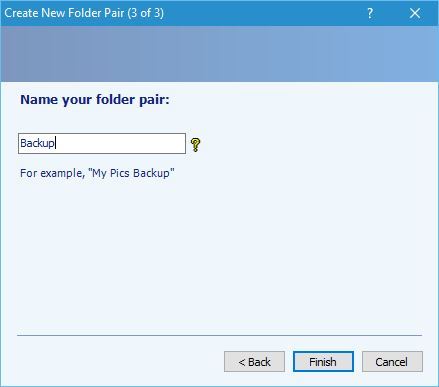
- Enter the name of the folder pair and click the Finish button.

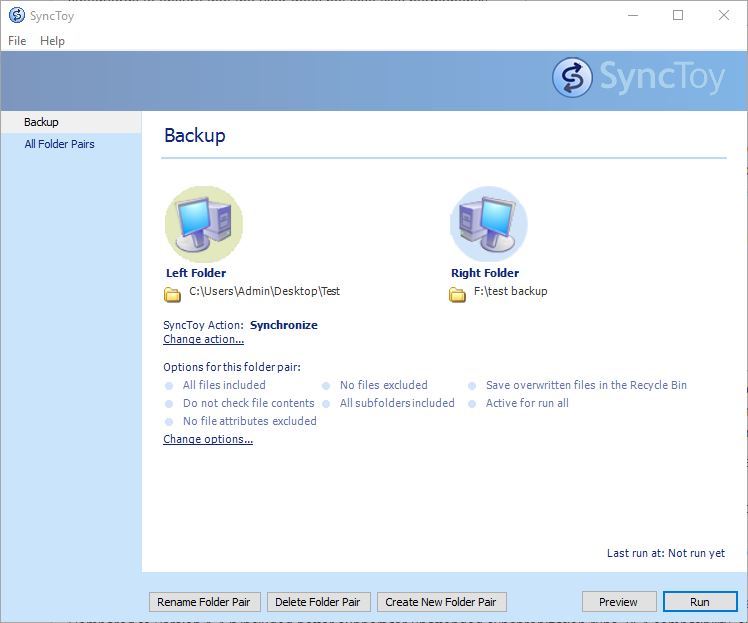
After creating the folder pair, you can see its properties. If you want, you can change the Synchronization settings at any time and you can even exclude certain files from synchronization. Synchronizing folders is simple, and to do that just click the Run button.
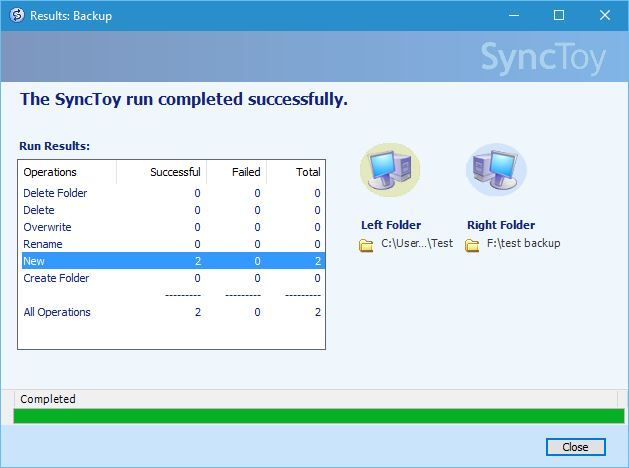
After the syncing process is completed you’ll see a detailed report.
SyncToy | Copy, Backup, Sync and Schedule Tasks FREELY with SyncToy
Wednesday, July 22, 2020
Operating system edition |
KMS Client Setup Key |
|---|---|
| Windows Server Datacenter | 6NMRW-2C8FM-D24W7-TQWMY-CWH2D |
| Windows Server Standard | N2KJX-J94YW-TQVFB-DG9YT-724CC |
Windows Server LTSC/LTSB versions
Windows Server 2019
| Operating system edition | KMS Client Setup Key |
|---|---|
| Windows Server 2019 Datacenter | WMDGN-G9PQG-XVVXX-R3X43-63DFG |
| Windows Server 2019 Standard | N69G4-B89J2-4G8F4-WWYCC-J464C |
| Windows Server 2019 Essentials | WVDHN-86M7X-466P6-VHXV7-YY726 |
Windows Server 2016
| Operating system edition | KMS Client Setup Key |
|---|---|
| Windows Server 2016 Datacenter | CB7KF-BWN84-R7R2Y-793K2-8XDDG |
| Windows Server 2016 Standard | WC2BQ-8NRM3-FDDYY-2BFGV-KHKQY |
| Windows Server 2016 Essentials | JCKRF-N37P4-C2D82-9YXRT-4M63B |
Windows 10, all supported Semi-Annual Channel versions
| Operating system edition | KMS Client Setup Key |
|---|---|
| Windows 10 Pro | W269N-WFGWX-YVC9B-4J6C9-T83GX |
| Windows 10 Pro N | MH37W-N47XK-V7XM9-C7227-GCQG9 |
| Windows 10 Pro for Workstations | NRG8B-VKK3Q-CXVCJ-9G2XF-6Q84J |
| Windows 10 Pro for Workstations N | 9FNHH-K3HBT-3W4TD-6383H-6XYWF |
| Windows 10 Pro Education | 6TP4R-GNPTD-KYYHQ-7B7DP-J447Y |
| Windows 10 Pro Education N | YVWGF-BXNMC-HTQYQ-CPQ99-66QFC |
| Windows 10 Education | NW6C2-QMPVW-D7KKK-3GKT6-VCFB2 |
| Windows 10 Education N | 2WH4N-8QGBV-H22JP-CT43Q-MDWWJ |
| Windows 10 Enterprise | NPPR9-FWDCX-D2C8J-H872K-2YT43 |
| Windows 10 Enterprise N | DPH2V-TTNVB-4X9Q3-TJR4H-KHJW4 |
| Windows 10 Enterprise G | YYVX9-NTFWV-6MDM3-9PT4T-4M68B |
| Windows 10 Enterprise G N | 44RPN-FTY23-9VTTB-MP9BX-T84FV |
Windows 10 LTSC/LTSB versions
Windows 10 LTSC 2019
| Operating system edition | KMS Client Setup Key |
|---|---|
| Windows 10 Enterprise LTSC 2019 | M7XTQ-FN8P6-TTKYV-9D4CC-J462D |
| Windows 10 Enterprise N LTSC 2019 | 92NFX-8DJQP-P6BBQ-THF9C-7CG2H |
Windows 10 LTSB 2016
| Operating system edition | KMS Client Setup Key |
|---|---|
| Windows 10 Enterprise LTSB 2016 | DCPHK-NFMTC-H88MJ-PFHPY-QJ4BJ |
| Windows 10 Enterprise N LTSB 2016 | QFFDN-GRT3P-VKWWX-X7T3R-8B639 |
Windows 10 LTSB 2015
| Operating system edition | KMS Client Setup Key |
|---|---|
| Windows 10 Enterprise 2015 LTSB | WNMTR-4C88C-JK8YV-HQ7T2-76DF9 |
| Windows 10 Enterprise 2015 LTSB N | 2F77B-TNFGY-69QQF-B8YKP-D69TJ |
Earlier versions of Windows Server
Windows Server, version 1803
| Operating system edition | KMS Client Setup Key |
|---|---|
| Windows Server Datacenter | 2HXDN-KRXHB-GPYC7-YCKFJ-7FVDG |
| Windows Server Standard | PTXN8-JFHJM-4WC78-MPCBR-9W4KR |
Windows Server, version 1709
| Operating system edition | KMS Client Setup Key |
|---|---|
| Windows Server Datacenter | 6Y6KB-N82V8-D8CQV-23MJW-BWTG6 |
| Windows Server Standard | DPCNP-XQFKJ-BJF7R-FRC8D-GF6G4 |
Windows Server 2012 R2
| Operating system edition | KMS Client Setup Key |
|---|---|
| Windows Server 2012 R2 Server Standard | D2N9P-3P6X9-2R39C-7RTCD-MDVJX |
| Windows Server 2012 R2 Datacenter | W3GGN-FT8W3-Y4M27-J84CP-Q3VJ9 |
| Windows Server 2012 R2 Essentials | KNC87-3J2TX-XB4WP-VCPJV-M4FWM |
Windows Server 2012
| Operating system edition | KMS Client Setup Key |
|---|---|
| Windows Server 2012 | BN3D2-R7TKB-3YPBD-8DRP2-27GG4 |
| Windows Server 2012 N | 8N2M2-HWPGY-7PGT9-HGDD8-GVGGY |
| Windows Server 2012 Single Language | 2WN2H-YGCQR-KFX6K-CD6TF-84YXQ |
| Windows Server 2012 Country Specific | 4K36P-JN4VD-GDC6V-KDT89-DYFKP |
| Windows Server 2012 Server Standard | XC9B7-NBPP2-83J2H-RHMBY-92BT4 |
| Windows Server 2012 MultiPoint Standard | HM7DN-YVMH3-46JC3-XYTG7-CYQJJ |
| Windows Server 2012 MultiPoint Premium | XNH6W-2V9GX-RGJ4K-Y8X6F-QGJ2G |
| Windows Server 2012 Datacenter | 48HP8-DN98B-MYWDG-T2DCC-8W83P |
Windows Server 2008 R2
| Operating system edition | KMS Client Setup Key |
|---|---|
| Windows Server 2008 R2 Web | 6TPJF-RBVHG-WBW2R-86QPH-6RTM4 |
| Windows Server 2008 R2 HPC edition | TT8MH-CG224-D3D7Q-498W2-9QCTX |
| Windows Server 2008 R2 Standard | YC6KT-GKW9T-YTKYR-T4X34-R7VHC |
| Windows Server 2008 R2 Enterprise | 489J6-VHDMP-X63PK-3K798-CPX3Y |
| Windows Server 2008 R2 Datacenter | 74YFP-3QFB3-KQT8W-PMXWJ-7M648 |
| Windows Server 2008 R2 for Itanium-based Systems | GT63C-RJFQ3-4GMB6-BRFB9-CB83V |
Windows Server 2008
| Operating system edition | KMS Client Setup Key |
|---|---|
| Windows Web Server 2008 | WYR28-R7TFJ-3X2YQ-YCY4H-M249D |
| Windows Server 2008 Standard | TM24T-X9RMF-VWXK6-X8JC9-BFGM2 |
| Windows Server 2008 Standard without Hyper-V | W7VD6-7JFBR-RX26B-YKQ3Y-6FFFJ |
| Windows Server 2008 Enterprise | YQGMW-MPWTJ-34KDK-48M3W-X4Q6V |
| Windows Server 2008 Enterprise without Hyper-V | 39BXF-X8Q23-P2WWT-38T2F-G3FPG |
| Windows Server 2008 HPC | RCTX3-KWVHP-BR6TB-RB6DM-6X7HP |
| Windows Server 2008 Datacenter | 7M67G-PC374-GR742-YH8V4-TCBY3 |
| Windows Server 2008 Datacenter without Hyper-V | 22XQ2-VRXRG-P8D42-K34TD-G3QQC |
| Windows Server 2008 for Itanium-Based Systems | 4DWFP-JF3DJ-B7DTH-78FJB-PDRHK |
Earlier versions of Windows
Windows 8.1
| Operating system edition | KMS Client Setup Key |
|---|---|
| Windows 8.1 Pro | GCRJD-8NW9H-F2CDX-CCM8D-9D6T9 |
| Windows 8.1 Pro N | HMCNV-VVBFX-7HMBH-CTY9B-B4FXY |
| Windows 8.1 Enterprise | MHF9N-XY6XB-WVXMC-BTDCT-MKKG7 |
| Windows 8.1 Enterprise N | TT4HM-HN7YT-62K67-RGRQJ-JFFXW |
Windows 8
| Operating system edition | KMS Client Setup Key |
|---|---|
| Windows 8 Pro | NG4HW-VH26C-733KW-K6F98-J8CK4 |
| Windows 8 Pro N | XCVCF-2NXM9-723PB-MHCB7-2RYQQ |
| Windows 8 Enterprise | 32JNW-9KQ84-P47T8-D8GGY-CWCK7 |
| Windows 8 Enterprise N | JMNMF-RHW7P-DMY6X-RF3DR-X2BQT |
Windows 7
| Operating system edition | KMS Client Setup Key |
|---|---|
| Windows 7 Professional | FJ82H-XT6CR-J8D7P-XQJJ2-GPDD4 |
| Windows 7 Professional N | MRPKT-YTG23-K7D7T-X2JMM-QY7MG |
| Windows 7 Professional E | W82YF-2Q76Y-63HXB-FGJG9-GF7QX |
| Windows 7 Enterprise | 33PXH-7Y6KF-2VJC9-XBBR8-HVTHH |
| Windows 7 Enterprise N | YDRBP-3D83W-TY26F-D46B2-XCKRJ |
| Windows 7 Enterprise E | C29WB-22CC8-VJ326-GHFJW-H9DH4 |